





04.03.2026
7 Recruitment Biases Even Seasoned Specialists Still Fall For

Creating a sourcing strategy is a lot like cooking. Sure, you need to know how to use a knife, a whisk, and a stove. But without a recipe and a solid understanding of your ingredients, even the fanciest menu could end in disaster.
In recruitment, Boolean search queries are your kitchen tools. These instruments allow you to combine and leverage various elements — the requirements. Your recipe is the detailed profile of your ideal candidate. Without it, you won’t know how to source (“cook”) the right profiles.
You might be a whiz at crafting queries but still make the mistake of mindlessly cramming in every keyword without considering alternate terms. In this case, your “dough” might not rise. Or you could be a master of technical requirements, fully aligned with the hiring manager’s expectations. But if you don’t know how to put this into a smart query, the same candidates will appear twice in the search results, or, conversely, you won’t see the right specialists. In other words, your vegetables and herbs will rot on the shelf.
Here, I explain a logical search, how to create queries, find the exact keywords, and not to miss a single talented specialist.
Our plan:
To create a query, recruiters need to understand Boolean logic. Boolean Search is finding web pages that match specific criteria using logical operators. In other words, Boolean Search means literally “logical search.” This method can be applied in search engines (Google, Bing, Yahoo!) and on platforms with a search bar (LinkedIn and others).
Filtering happens with the help of special operators, such as:
Important! The operators listed above must be entered in uppercase letters; otherwise, they won’t work.
Let’s look at an example. If you enter “Scala AND Play AND React” in the search bar, you’ll find pages that contain all three keywords. For more advanced, multi-level queries, consider this. This query will return pages mentioning Ruby and frontend frameworks while excluding vacancy posts:
((Rubу OR “Ruby on rails” OR RoR) AND (Vue OR React OR Angular)) -job -vacancy -hire
Boolean search for IT recruiters is essential for working in search engines and LinkedIn. Without it, the search for IT specialists becomes chaotic and unproductive.
While Boolean search in Google provides results on different sites, X-Ray is a type of Boolean search where the results relate to a single resource. For example, the query: “site:linkedin.com Java” will filter out the pages of this professional social network that contain the keyword Java. Although you’re entering the query in Google, all results will pertain specifically to LinkedIn. This technique is known as X-Ray Search. Some sources treat Boolean and X-Ray Search as interchangeable terms.
Here’s a collection of tools to help you craft efficient search queries:
So, we got the tools covered. Let’s analyze our recipe!
Boolean search operators are just a small part of a recruiter’s toolkit. In practice, you’ll spend much more time developing sourcing strategies tailored to specific IT vacancies. Let’s break down the process step by step.
Identify keywords from the vacancy description
When you start working on a vacancy posting, you might be tempted to procrastinate by crafting an overly complex query logic with multi-layered keywords. On the other hand, you might rush in and reuse a query from a similar vacancy from last year without taking the time to strategize. Both approaches could be better. To build an effective search query, start at the beginning — with the keywords.
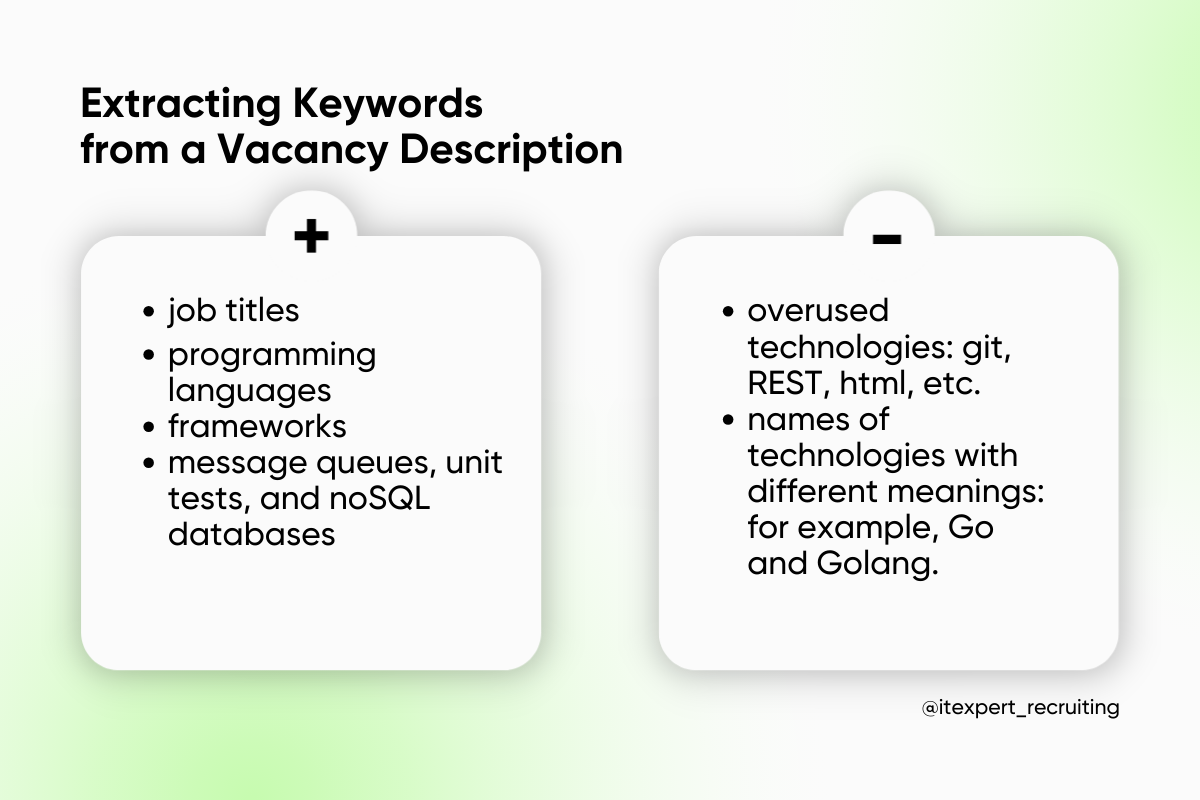
For developer roles, keywords often include primary frameworks or programming languages like Java, JavaScript, React, or Vue. For other positions, it might make more sense to focus on job titles, their synonyms, or alternatives, such as Business Analyst, Product Manager, or Product Owner.
Message queues, unit tests, and NoSQL databases will be useful for narrowing down your requests. They will help you find experienced candidates.
To avoid spamming your query, remember that vacancy postings contain many keywords that should be ignored. It is better not to include technologies that almost every candidate uses, such as git, REST, html, etc.
Some words may seem like good keywords. Yet, when it comes to sourcing, they don’t work. For example, the abbreviated name of Golang, a programming language, is Go. Using “Go” as a keyword in your query can backfire because it is a common word in English and will appear in many irrelevant results, like company names or unrelated text. In such cases, you’ll need to carefully evaluate whether a shorthand term might have broader, unintended meanings.
Keywords from the vacancy description are a great starting point, but they aren’t the only source of insights.
Your initial queries will yield candidates, but search results can quickly dry up. To expand your reach of keywords, analyze developer profiles to identify additional technologies frequently mentioned. If you notice recurring ones, they will help you.
Additionally, during your search, pay attention to profiles that don’t meet your criteria. The more irrelevant candidates you encounter, the more time you’ll spend reviewing them. Each unsuitable profile consumes valuable time. Therefore, you should analyze which keywords combine irrelevant candidates and enter them into the search using NOT/minus to filter them out.
Not all technologies or keywords in vacancy descriptions will appear in candidate profiles. In some cases, keywords can drastically reduce the number of search results. If you include such a word using the AND operator alongside your main query, you may end up with no results at all. For instance, only about 200 specialists in a local talent market are experienced with Pixi in the GameDev domain. Adding an extra keyword to narrow your search could result in LinkedIn showing zero candidates:) To avoid this, excluding overly restrictive keywords yielding minimal results is best.
Evaluating the number of results can help you determine the best search strategy. For instance, if your query generates a large pool of candidates, creating several focused searches to select only the most relevant profiles makes sense. Conversely, if your query is too restrictive and gives few results, consider broadening your search to cover more of the market.
Once you’ve chosen your strategy, move on to talent sourcing.
This stage involves fine-tuning your “recipe.” Experiment with different queries and explore new functions for filtering candidates.
In LinkedIn’s advanced version, you can use more operators and take advantage of enhanced search features. However, even in LinkedIn’s free version, IT recruiters conducting Boolean searches should keep these limitations in mind:
Once you’ve defined your strategy and crafted your Boolean query, it’s time to test, refine, and continually improve your search process. Depending on the stage of your search, you can adjust your queries as needed, all the way up until you fill the vacancy.
Boolean search: how to use it in practice? Let’s break down three practical cases from IT recruiting and take your queries to the next level.
The Scenario:
Let’s put it into practice. Vue.js has a unique quirk that you must consider at the first stage. This language has different spellings: Vue, VueJS, Vue JS… If the candidate has specified VueJS, and you have Vue in your search, you will not find it. If you write the term with a dot, it will be ignored by the search and perceived as a search for Vue. To see those specialists who wrote the term together, we should also add the keyword VueJS. The initial query looks like this: Vue OR VueJS.
This search query is quite long. We can reduce it by using specific technologies: Vuex and Quasar. The combined query will be as follows: (Vue OR VueJS) AND (Vuex OR Quasar).
Use the NOT operator to exclude Node.js. By adding (Figma OR Scss OR grid) to the query, we will find those experienced in layout. Thus, our full query will look like this: ((Vue OR VueJS) AND (Vuex OR Quasar) AND (Figma OR SCSS OR grid)) NOT Node.

Such vacancies complicate the LinkedIn search. You’ll need to carefully analyze the vacancy description and identify the most critical information. This might include the nature of the role or particular candidate requirements.
For instance, if the candidate should act as a manager and focus more on business solutions than technical tasks, you can search by job titles like VP of Engineering, CTO, or CIO under current positions. To filter out candidates focused on technical roles, you can use NOT Architect in your query.
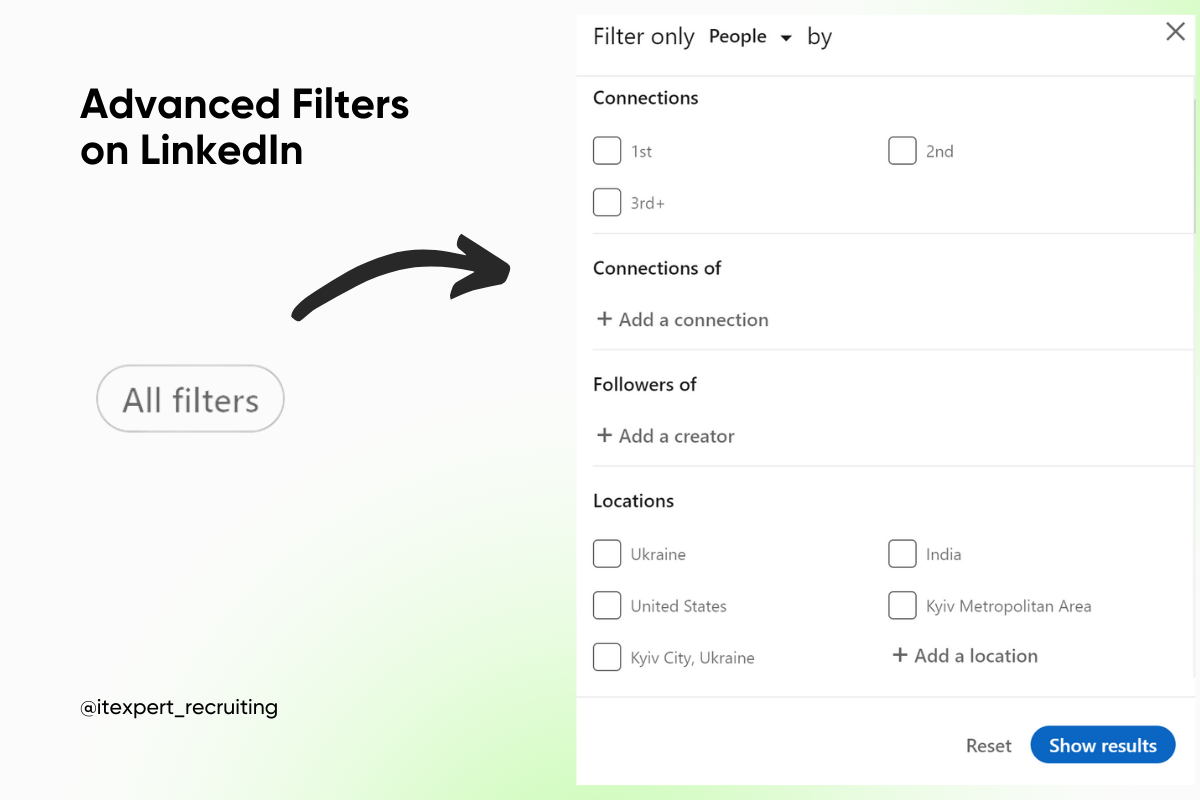
Don’t overlook LinkedIn’s advanced filters. For example, use the “Company sizes” filter to find candidates who have experience working at large organizations if that aligns with the vacancy’s requirements.

Such vacancies confuse recruiters: it is unclear who they need to look for.
Using Boolean search in recruiting, you can create combinations of different search queries simultaneously by combining AND and OR. For example: (Java AND Spring Boot) OR (Java AND Hadoop AND Spark).
Sure, these queries may look complicated. However, this approach allows you to fit all options into a single query and present the vacancy to all candidates who meet the criteria. The advantage of combining search queries is when candidates have skills across multiple areas; they won’t appear multiple times as they would in separate searches for each technology. This saves you time on sourcing and lets you focus more on communication and working on offers.
While we’ve reviewed several cases here, every vacancy is different. Success depends on experimenting, combining methods, and selecting approaches that work for your needs. To build effective search queries, communicate with hiring managers to get detailed information or consult with experts for guidance!


